while ! nc -w5 -z 10.0.0.100 22; do echo "hello"; done
Showing posts with label bash. Show all posts
Showing posts with label bash. Show all posts
Friday, February 14, 2020
Sunday, March 11, 2018
linux: List all IP addresses in a network
To list ip addresses of all connected to the network devices, use this command:
nmap -sn 192.168.0.0/24
bash: How to check what hides behind an alias
To check what command is assigned to the alias use type command:
$ type gl
gl is aliased to `git log --oneline'
Thursday, November 2, 2017
Monitor process with top
One liner to monitor a process with the name /wshub:
top -p "$(pgrep -f /wshub)"
Friday, October 13, 2017
Monitor cpu and memory usage of the process
Print every second cpu and memory usage of the process:
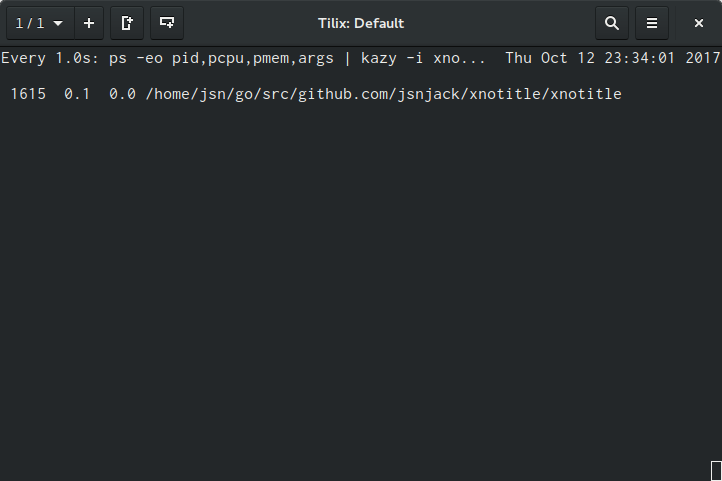
watch -n 1 "ps -eo pid,pcpu,pmem,args | kazy -i xnotitle -e kazy"
Monday, May 8, 2017
Get size of the subfolders
Use this command to print size of the subfolders:
If you want to exclude Permission denied errors, for example:
du -sh *
du -sh * 2>/dev/null
Monday, March 27, 2017
Thursday, December 10, 2015
bash: How to remove all *.pyc files
Remove all *.pyc files from the current directory (and subdirectories):
find . -name \*.pyc -delete
Tuesday, December 9, 2014
bash: Colourful side-by-side command line diff
I have never liked default linux diff command. The more changes you make, the less informative it becomes. When you work with git it would be nice to have side-by-side comparison of original file and a new file with changes. Graphical tools like smartgit and meld do it really impressive.
But sometimes it is more comfortable to use command line tools. For colourful side-by-side git diff you can use cdiff. The simpliest way to install it is with pip package manager:
Then in your repository run:
And the result is gorgeous!

The next tool is called icdiff. It does basicly the same, but with files. Install it with that command:

Use it like this:
But sometimes it is more comfortable to use command line tools. For colourful side-by-side git diff you can use cdiff. The simpliest way to install it is with pip package manager:
pip install cdiff
Then in your repository run:
cdiff -s
And the result is gorgeous!

The next tool is called icdiff. It does basicly the same, but with files. Install it with that command:
curl -s https://raw.githubusercontent.com/jeffkaufman/icdiff/release-1.2.0/icdiff \
  | sudo tee /usr/local/bin/icdiff > /dev/null \
  && sudo chmod ugo+rx /usr/local/bin/icdiff

Use it like this:
icdiff file1 file2
Friday, October 17, 2014
bash: Как изменить командную строку в bash
В bash командную строку можно изменить присвоив значение PS1 в терминале. Вот эта команда добавит время, полный путь в запрос, а также выведет его на следующую строку:
 Чтобы изменения сохранились после перезагрузки, добавьте эту строку в файл ~/.bashrc:
Список специальных символов:
Чтобы изменения сохранились после перезагрузки, добавьте эту строку в файл ~/.bashrc:
Список специальных символов:
$ PS1="\[\033[01;32m\]\t \[\033[01;34m\]\w\[\033[00m\]\[\033[1;32m\]\n\$ \[\033[m\]"

# Configure prompt
export PS1="\[\033[01;31m\]\$([ \$? == 0 ] || echo \"!\$? \" )\[\033[00m\]\[\033[01;32m\]\t \[\033[01;34m\]\w\[\033[00m\]\[\033[1;32m\]\n\$ \[\033[m\]"
\d The date, in "Weekday Month Date" format (e.g., "Tue May 26").
\h The hostname, up to the first . (e.g. deckard)
\H The hostname. (e.g. deckard.SS64.com)
\j The number of jobs currently managed by the shell.
\l The basename of the shell's terminal device name.
\s The name of the shell, the basename of $0 (the portion following the final slash).
\t The time, in 24-hour HH:MM:SS format.
\T The time, in 12-hour HH:MM:SS format.
\@ The time, in 12-hour am/pm format.
\u The username of the current user.
\v The version of Bash (e.g., 2.00)
\V The release of Bash, version + patchlevel (e.g., 2.00.0)
\w The current working directory.
\W The basename of $PWD.
\! The history number of this command.
\# The command number of this command.
\$ If you are not root, inserts a "$"; if you are root, you get a "#" (root uid = 0)
\nnn The character whose ASCII code is the octal value nnn.
\n A newline.
\r A carriage return.
\e An escape character.
\a A bell character.
\\ A backslash.
\[ Begin a sequence of non-printing characters. (like color escape sequences). This allows bash to calculate word wrapping correctly.
\] End a sequence of non-printing characters.
Wednesday, September 17, 2014
bash: Как следить за процессами
Для того, чтобы вывести в консоль информацию о каком либо процессе (фильтруется по имени) можно воспользоваться командой:
Эта команда выведет все процессы связанные с celery и ограничит вывод 5 штуками
watch -n 1 'ps ax -o rss,user,command | sort -nr | grep celery |head -n 5'
Эта команда выведет все процессы связанные с celery и ограничит вывод 5 штуками
bash: Как выводить в консоль изменения в файле
Эта команда позволяет выводить в консоль последние строчки в файле. Если в файл будут добавлены новые строки, они автоматически отобразятся в консоли. Очень удобно следить за логами:
где filename - имя файла
tail -f filename
где filename - имя файла
Subscribe to:
Posts (Atom)